
Turn interest in a product into a buying path a customer can follow. For a first social collection, clear images, useful specifications and a consistent order process make each post work harder. Start with one customer group and a manageable selection.
This guide focuses on using Instagram to introduce products and handle appropriate inquiries, with a reliable checkout or invoicing process. Native shopping features have their own eligibility and availability. You can plan the customer journey while checking the tools available to your account.
Decide what the account helps people buy
Choose one customer situation. You might offer lightweight accessories for everyday outfits, useful stationery for small gifts, or compact home items suited to limited space. Describe the benefit in ordinary language. “Small gifts that are easy to send” tells a visitor more than “a curated lifestyle.”
Use a recognizable business name and a profile image that stays legible at thumbnail size. Add a short description of what you sell, where you serve customers and how to order. Give customers a contact method you can maintain. Keep business contact details separate from private family information.
For account setup, consult Meta’s business-account guidance and the account tools in your app. Menu labels and feature access may differ. Treat opening a professional account, getting shopping features and qualifying with a wholesale supplier as separate tasks.
Write a profile that gives a next step
A practical fill-in profile is: “[Product category] for [customer or occasion]. Serving [area]. [Order route] below. Questions: [contact].” Adapt the wording to your character and available space. Do not claim local manufacture or stock availability unless it is true.
Give the main profile link one clear purpose. If you have an online store, link to the relevant collection. If you begin with inquiries, use a page explaining product options, prices and how an order is confirmed. A confusing list of unrelated destinations makes a small first collection harder to buy.
If a separate store would simplify payment and stock management, follow the optional Shopify setup guide. You do not need to build a Shopify site merely to make the profile look established. Select the transaction tool that fits your actual selling process.
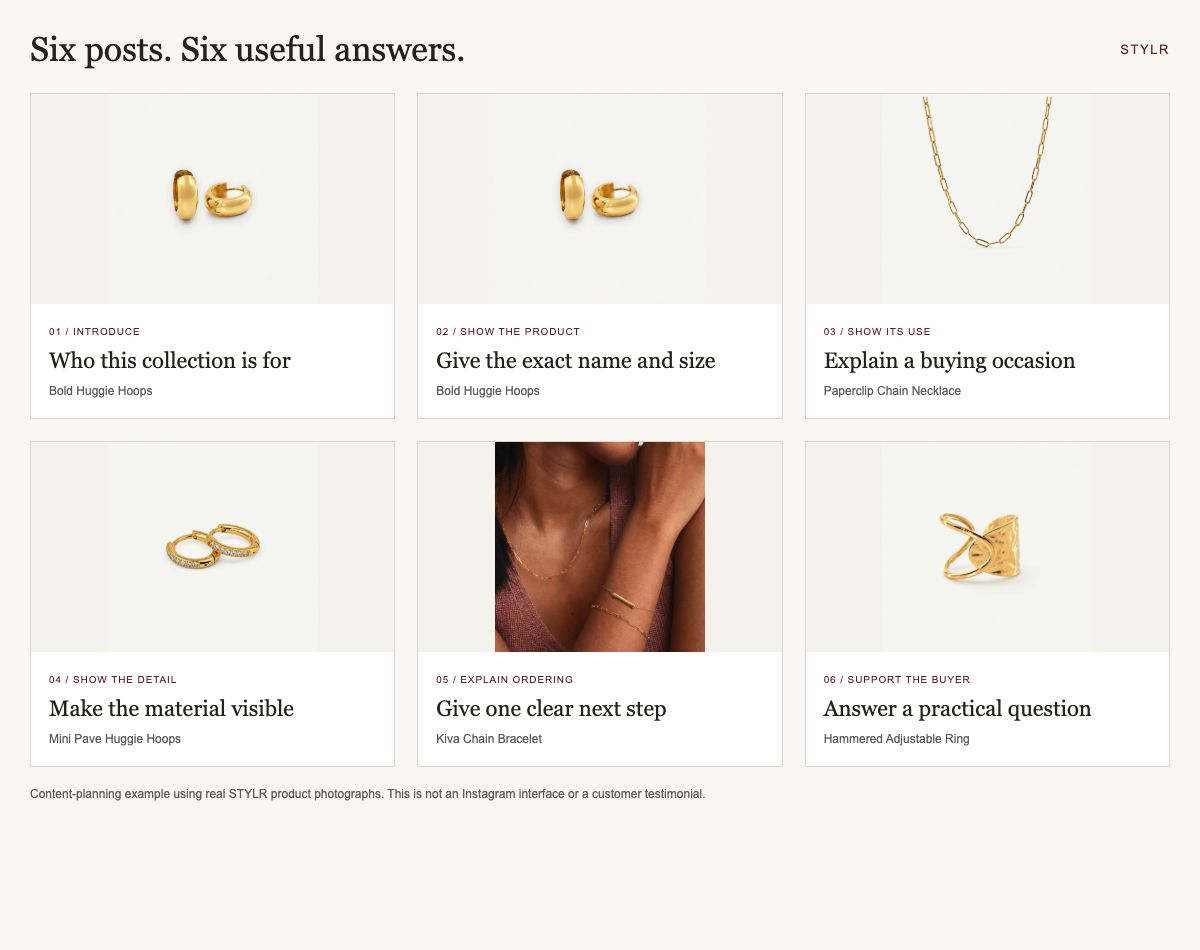
Prepare six posts that answer six questions
| Post | What to show | Caption prompt |
|---|---|---|
| Introduction | You selecting or arranging real products | “I selected this collection for ___ because ___.” |
| Hero product | The exact item with visible scale | “This is ___; it measures ___ and costs ___.” |
| Use | The item in an ordinary setting | “For ___, here is how it fits into ___.” |
| Detail | Closure, finish, texture or contents | “Before choosing, notice ___.” |
| Ordering | A simple written buying path | “Choose ___, order through ___, expect ___.” |
| Service | Packing or care guidance | “After ordering, we ___; for help, contact ___.” |
These are content jobs, not a requirement to publish six posts at once. Start with the questions blocking a decision. Use accurate photographs and readable captions; alt text should describe the image’s meaningful content. Record which posts lead to specific inquiries so the next session responds to actual needs.
Make the route from inquiry to order explicit
Write one standard response you can personalize: “Thanks for asking about [item]. The [variant] is [price]. Delivery to [area] is [cost or calculation method], with [dispatch estimate]. You can review the details and pay securely here: [checkout or invoice link].” Check availability before sending.
Keep card details out of direct messages. Use your chosen payment service’s appropriate checkout or invoice process. A conversation should identify the product and answer questions, while the transaction record captures the customer’s purchase and relevant delivery details.
Once payment is confirmed in the payment system, record the item, variant, quantity and promised dispatch window. Confirm the order using a consistent process. A screenshot sent by a buyer is not a substitute for checking your own payment record.
Keep a small operating record
A basic order sheet can include order reference, date, product code, variant, quantity, payment status, dispatch deadline, tracking and any unresolved question. Limit access to those who need it. Keep customer information out of public content and demonstration screenshots.
Set a routine for updating available quantities and answering messages. If the last item sells elsewhere, update the social buying route promptly. If a parcel is delayed, use the customer’s contact details for the order update rather than leaving them to ask repeatedly.
After delivery, invite honest feedback without scripting praise. Ask permission before reusing a customer’s image or words. If you have no reviews yet, show useful product details and your own process; those are legitimate ways to build understanding from the start.
Measure useful activity during the first week
Track profile visits, relevant inquiries, checkout visits where measurable and completed orders. Add the questions that prevented a purchase: size, price, shipping, material, availability or trust. Likes can help identify interest, but they do not establish willingness to pay your full order total.
Pick one improvement for the following week. If people ask about size, add scale photographs. If they abandon the ordering instructions, shorten the route. If the audience is wrong for the product, revise the customer description before increasing posting volume or spending on ads.
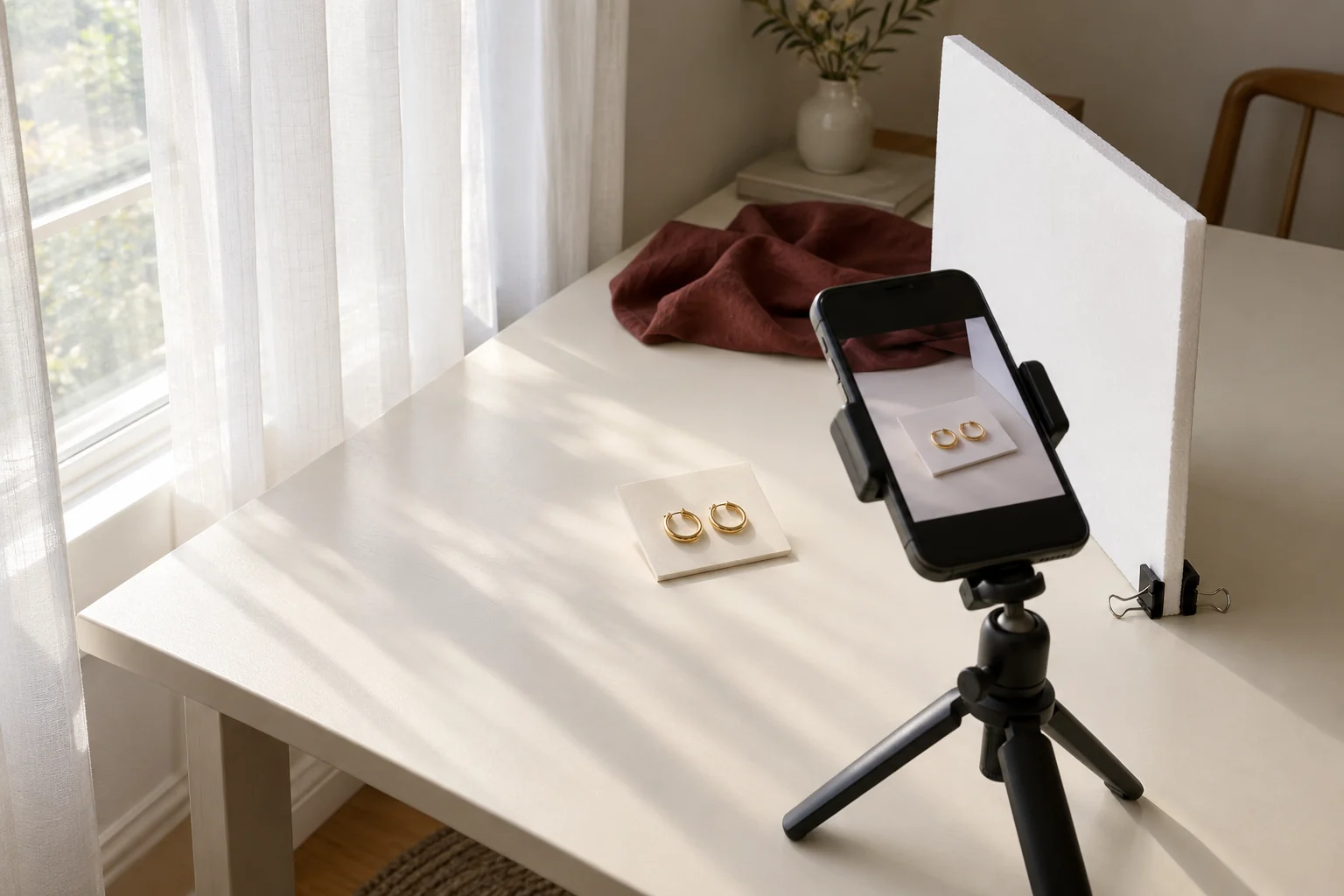
- Place the product beside a window with a thin curtain; turn off mixed-color room lights.
- Put a white board on the opposite side to soften shadows. Fix your phone and keep the lens clean.
- Take a full view, a close detail and a scale view. Compare the real item with the image before publishing.
Show the choice, then show the detail
Hypothetical jewelry example: introduce two hoop silhouettes with a simple comparison photograph. Follow with a close view of the closure and an image that shows scale on a person. The caption should identify the exact option and price, while the ordering link takes the reader to that option. This sequence helps someone choose without relying on a long list of style adjectives.
Your buying-path worksheet
- My customer’s buying situation: ____________________
- My clearest product, price and variant example: ____________________
- My profile’s order destination: ____________________
- Who checks inquiries and when: ____________________
- How payment, stock and dispatch are recorded: ____________________
- The question I will answer in my next post: ____________________
- The result I will review after seven days: ____________________
Find reusable prompts in the starter kit. When your sales channel and product plan are ready for wholesale buying, review Faire’s retailer requirements. A polished profile supports communication; the supplier still assesses the real business behind it.
Publish one useful test post.
Practice checklist only. Answers stay on this page and are not submitted or saved.
FINISH THIS STEP, THEN CONTINUE
Complete one channel route
Your profile explains who the products are for, how to order and who handles delivery. You do not need to finish the Shopify guide as well.
Put the checklist to work.
Get a personal starting plan, the printable workbook, and a starter kit with setup checklists, editable worksheets and social-post templates.
Find my first step + get the kit →See your summary first. Request the complete plan and files by email. No purchase required.